The Russian Ministry root, only for Russian services
I needed a bank statement, but tbank.ru would not open on my laptop. Instead, the browser showed a page at status.tbank-online.com/?internal_source=sw.
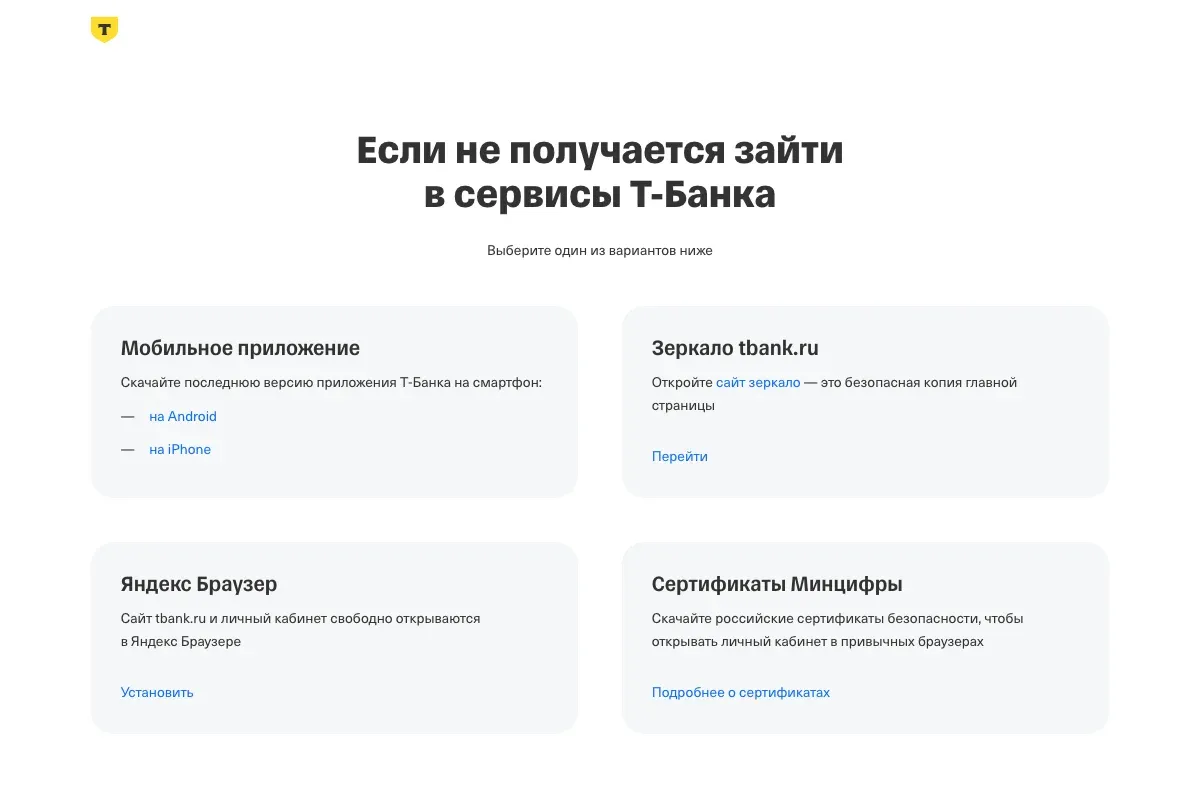
A hyphenated domain, the bank’s name inside, an odd parameter in the URL. I had two unlikely hypotheses:
- Someone hacked my MacBook and, in the classic way, slipped a fake address for
tbank.ruinto/etc/hosts. - Someone hacked T-Bank and set up a redirect to a phishing site.
Life turned out harsher and more pragmatic than it seemed at first.
Checking
Curious and puzzled, I started a conversation with an AI assistant and dug in.
whois tbank-online.com showed registration through REG.RU in April 2024, nic.ru name servers and payment until 2030. status.tbank-online.com resolves to 178.130.128.240, in the RU-TINKOFF-MOBILE-LIR network of T-MOB LLC. The real tbank.ru lives at 178.130.128.27, in the same /24 block. An address alone proves nothing: a domain owner can point it anywhere. But the server at this address answers to the name status.tbank-online.com and presents a certificate for it, so the domain is served by the bank’s own network.
Meanwhile, the browser started the handshake with the original site, received this certificate and dropped the connection itself:
subject = CN=*.tbank.ru, O=TBank
issuer  = CN=Russian Trusted Sub CA, O=The Ministry of Digital Development
          └─ Russian Trusted Root CA
Verify return code: 19 (self-signed certificate in certificate chain)
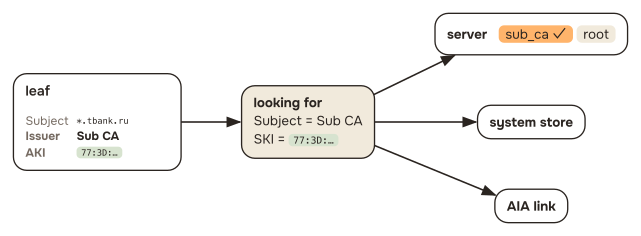
Why the browser drops the connection itself follows from how it checks a certificate. To accept a site’s certificate, the browser builds a chain up to a root it trusts. It looks up the issuer of each link by the Issuer and AKI fields: it needs a certificate with that Subject and SKI. Candidates come from what the server sent, from the system store and from the AIA link in the certificate itself. Here the chain reaches Russian Trusted Root CA, but that root is not in the macOS store, so the browser drops the connection.
Seems clear enough. T-Bank is under sanctions, this summer Western certificate authorities started revoking certificates of sanctioned companies, and in August the bank moved to the root of Russia’s Ministry of Digital Development. But where does the redirect come from?! Especially since the redirect target’s certificate is issued by Let’s Encrypt, and the browser trusts it:
subject = CN=*.tbank-online.com
issuer  = CN=YR1, O=Let's Encrypt
          └─ Root YR
             └─ ISRG Root X1
Verify return code: 0 (ok)
Where the redirect comes from
The hint was in the URL: internal_source=sw. sw is a service worker, a script a site registers in the browser once, which then intercepts requests to that site even when the site itself is unreachable. tbank.ru has one too.
When navigation to the site fails, the service worker checks whether the browser is online. Offline, it shows the usual placeholder. Online, but the request still failed, means the certificate is the problem, and it serves a fallback page from its cache. That page asks 2w.ru where to send the user, and right now the answer is a 302 to status.tbank-online.com/?internal_source=sw. That is the help page from the screenshot above, and the mirror opens through its “Перейти” (“Go”) button: it leads to 2w.ru/tbank-actual-mirror, which answers with a 302 to the current mirror, currently www.tbank-online.com.
What remained was to see what all of this is called in the code. The cache holding the fallback page is called sertificates-revocation-cache, with an s at the start. Presumably as a symbol that the certificate, too, has moved to a domestic root. Metrics from the page are sent with the label project: "cert-revocation". Next to it the code has a probe of mddc.tbank.ru, which the page uses to find out whether the browser has the Ministry root installed.
And here is the answer: nobody hacked either my MacBook or T-Bank, and the bank prepared the redirect to a spare domain itself, in case browsers stop accepting its certificate.
Spare domains
The fallback page has a hardcoded list of mirrors:
www.tbank-online.com            www.web-cabinet-service.com
www.web-cabinet-online.com      www.online-service-account.com
www.service-account-online.com  www.cabinet-web-service.com
Five of the six are on Let’s Encrypt, like status.tbank-online.com. The sixth, www.service-account-online.com, currently presents a TrustAsia certificate for *.cdn-tinkoff.ru, which the browser rejects because the mirror’s name isn’t in it.
ISRG Root X1 is present in all current systems and browsers. The working mirrors open for everyone, including people who never installed the Ministry root. And www.tbank-online.com points to 178.130.128.27, the same address as tbank.ru.
Why tbank.ru itself did not stay on Let’s Encrypt, I don’t know: according to Mediazona, it was still on it in early August.
Why six domains instead of one? T-Bank does with its website what it has long been doing with its iPhone app. The official app was removed from the App Store in March 2023, after EU sanctions, and since then the bank keeps publishing it under other names: in April 2025 it was Freelance Case, in June 2026 Toastmas. Apple removes them within a day or two, and the bank publishes the next one.
The domains seem to work the same way: their names don’t show whose site it is, and they are disposable. If one gets burned, the fallback page has the next.
It’s funny: for decades people were taught to tell phishing sites from real ones by looking at the domain and distrusting hyphens and odd names. Now banks set up such domains themselves to get around restrictions. Someone used to visiting web-cabinet-service.com will one day just as calmly visit web-cabinet-services.com and not notice the difference.
What to do about it
The simplest option is to do nothing and use the mirrors. But then every visit to the bank goes through a domain that looks like phishing, and you train yourself not to look at the address.
The next simplest is to install the Ministry root in the system. But a root certificate authority can issue a valid certificate for any domain, gmail.com included, and the system will silently accept it.
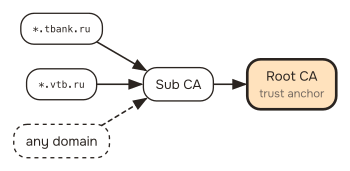
Yandex Browser, which ships with the root built in, is the same thing, plus Yandex ads in every place meant for them and every place not. I don’t want to use it, let alone trust it with my digital life.
There were other options, but they didn’t work either:
- A browser exception. Firefox and Safari let you accept an untrusted certificate and continue, and the root never enters the system. But the exception is tied to the specific site certificate and breaks on every reissue, and if the bank enables HSTS, the button disappears altogether.
- Binding to a domain in macOS. macOS trust settings have a field for a host name:
security add-trusted-cert -r trustRoot -p ssl -s tbank.ru root.pem. Safari understands it, but Firefox discards such an entry entirely, andcurltrips over Certificate Transparency. - A separate Firefox profile. Each profile has its own certificate store, so the root can go only into a banking profile. But inside that profile it works for any domain, and you have to switch profiles to get to the bank.
I wanted something else: to trust the Ministry root, but only for banks and other organisations on the sanctions lists. That’s what I took to my digital friend.
Cross-certificate
X.509 has the Name Constraints extension (RFC 5280), which limits a certificate authority to a list of domains. It solves the problem, but it lives inside the certificate, and you can’t edit someone else’s certificate without breaking its signature.
Nothing stops you from issuing your own copy of the root, though. A certificate is a name and a public key, vouched for by someone’s signature. The bank’s intermediate certificate, Russian Trusted Sub CA, is signed with the root’s private key, and verifying it only needs the matching public key. Which certificate holds that key and who signed it doesn’t matter to the verifier: it just keeps going up the chain until it reaches something it trusts.
So you can take the name and public key of the Ministry root, put them into a new certificate together with the constraint, and sign it with your own authority. The Ministry’s private key isn’t needed. RFC 5280 calls a certificate whose issuer and subject are different authorities a cross-certificate.
First, your own authority:
openssl req -x509 -newkey rsa:3072 -nodes -keyout localca.key -out localca.crt \
  -days 3650 -subj "/CN=Local Name Constraint CA" \
  -addext "basicConstraints=critical,CA:TRUE" \
  -addext "keyUsage=critical,keyCertSign,cRLSign" \
  -addext "subjectKeyIdentifier=hash"
The key of this authority is only needed to sign cross.crt. The authority itself will be trusted and unrestricted: whoever gets localca.key can issue a certificate for any domain. So it’s better to delete the key after signing, and to issue a new pair when the domain list changes.
Extensions for the cross-certificate:
[cross]
basicConstraints = critical,CA:TRUE
keyUsage = critical,keyCertSign,cRLSign
subjectKeyIdentifier = hash               # matches the original root's SKI
authorityKeyIdentifier = keyid:always     # my authority's identifier, not the root's
nameConstraints = critical,permitted;DNS:tbank.ru,permitted;DNS:sberbank.ru,\
  excluded;IP:0.0.0.0/0.0.0.0,excluded;IP:0:0:0:0:0:0:0:0/0:0:0:0:0:0:0:0
Sign with openssl x509; with the original root as input it keeps its subject and key. The LibreSSL that ships with macOS also needs -clrext, otherwise the root’s extensions get duplicated:
openssl x509 -in root.pem -CA localca.crt -CAkey localca.key \
  -set_serial 0x$(openssl rand -hex 8) -days 3650 \
  -extfile cross.cnf -extensions cross -out cross.crt
Why there are two files
localca.crt is the one to trust, and cross.crt is imported without trust, just as an intermediate.
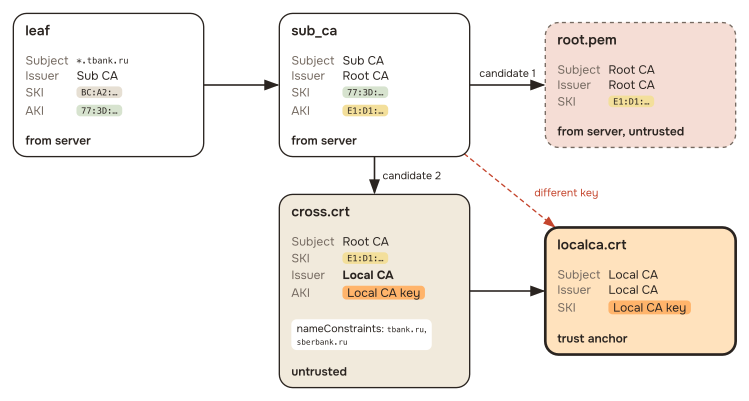
It’s tempting to make cross.crt self-signed and get by with one file. But a self-signature is made with the private key matching the key in the certificate, and that is the Ministry’s key. I can only sign it with my own authority, which is why cross.crt needs localca.crt above it.
Checking the constraint
The constraint can be checked locally, without installing anything:
$ cat sub_ca.pem cross.crt > untrusted.pem
$ openssl verify -CAfile localca.crt -untrusted untrusted.pem \
      -verify_hostname tbank.ru leaf_tbank.pem
leaf_tbank.pem: OK

$ openssl verify -CAfile localca.crt -untrusted untrusted.pem leaf_vtb.pem
error 47 at 0 depth lookup: permitted subtree violation
The second bank has the same root, and it is rejected.
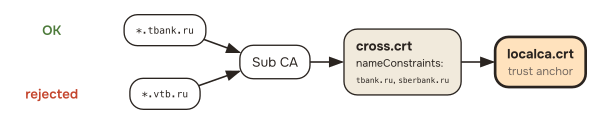
Every name in the certificate is checked
After switching to this scheme, sberbank.ru stopped opening, even though it was on the list:
$ openssl x509 -in sberbank.pem -noout -ext subjectAltName
DNS:sberbank.ru, DNS:www.sberbank.ru, DNS:sbrf.ru, DNS:www.sbrf.ru
Besides the main domain, Sber’s certificate lists sbrf.ru, the bank’s old name. The name constraint is checked for every name in the certificate, and one name outside the list is enough to reject the whole certificate. Otherwise the constraint could be bypassed by adding someone else’s domain next to an allowed one.
So the domain list should be built not from the addresses you visit but from the subjectAltName of their certificates. Pochta Bank’s certificate has such an extra name too: pchtbnk.ru.
How to set it up
All of this is packed into a script: nrydanov/scoped-ru-root-cert. It creates your own authority, signs a copy of the Ministry root with a constraint for the list, deletes the authority’s key and installs the pair: into the keychain on macOS, into the system store on Debian and Ubuntu. It removes the original Ministry root from the user keychain if it was there: a trusted original would take the chain to an anchor around the constraint. From System.keychain it has to be removed by hand. On macOS, Firefox picks up the pair from the system on its own.
git clone https://github.com/nrydanov/scoped-ru-root-cert
cd scoped-ru-root-cert
./install.sh
By default it uses minimal.txt with the largest banks, telecom operators, shops and government services; you can pass your own list as an argument, and send changes to the shared one as a pull request.